Small Business Call Center Software
Small Business Call Center Software — Easy Setup, All-In-One Features & Simple Pricing
SimpleCallCenter helps small teams handle inbound calls professionally — with IVR, routing, recordings, and optional AI features — without per-agent pricing or long-term contracts.
Set up your small business call center in under one hour
Calls (public & internal), ACD, recording, AI summaries, voicemail & supervisor tools — one dashboard, free desktop app
Plans start at $20/month — with usage included
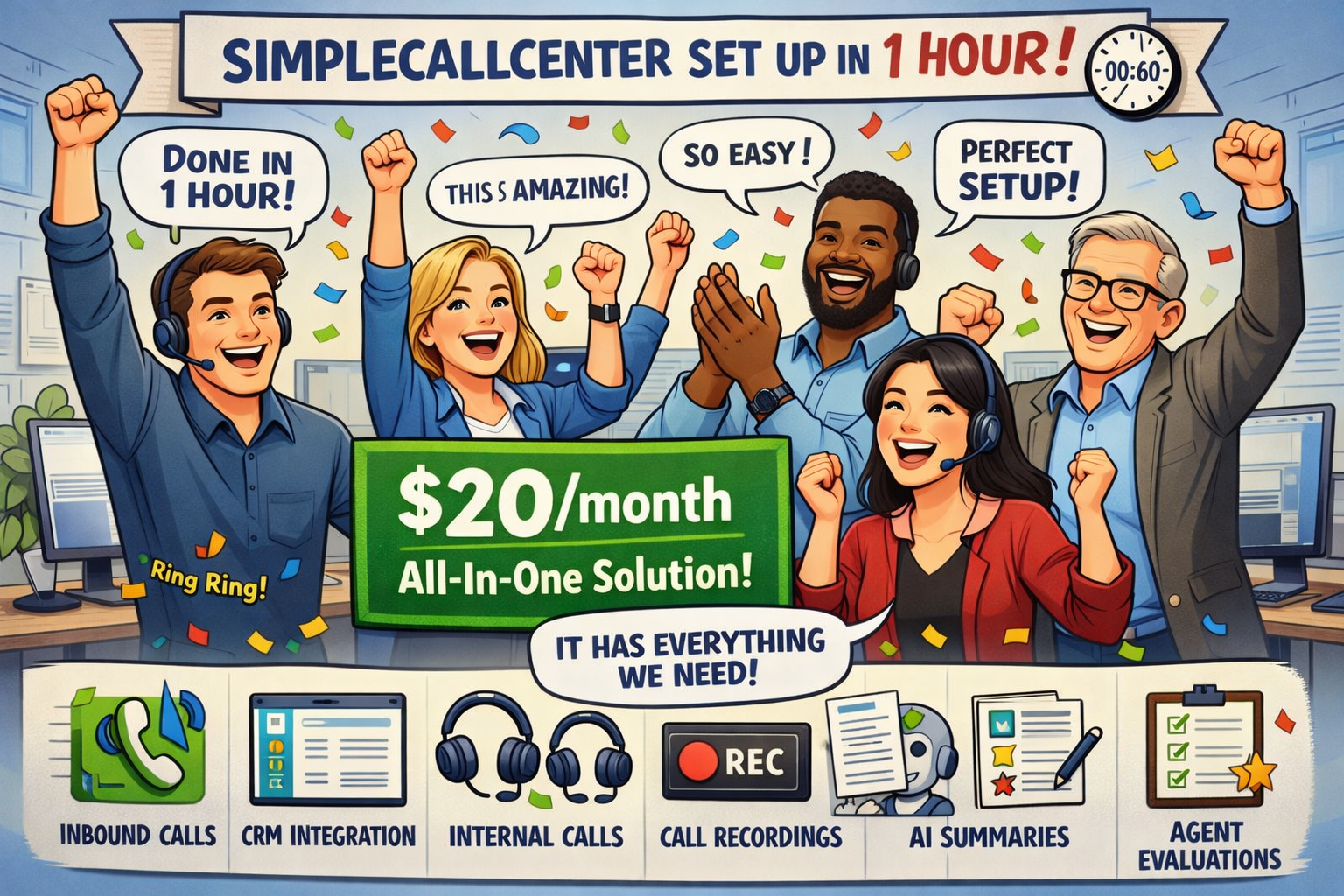
Plans start at $20/month — with usage included. Get your small business call center up and running in under one hour; handle calls, live chat, and emails from a single dashboard.
No credit card • No sales call • Set up in minutes
- Unlimited agents (no seat fees)
- Pay only for minutes + optional features
- Built for inbound support & service teams
What Is Small Business Call Center Software?
Unlike enterprise call center software or per-seat contact center suites, small business call center software is built for small teams: IVR, ACD (Automatic Call Distribution), recording, voicemail, and real-time reporting — with no per-seat pricing or long-term contracts.
Clear outcomes. The right software reduces missed calls, improves First Contact Resolution (FCR), and keeps Service Level Agreement (SLA) visibility — so small teams can compete on support quality without enterprise cost.
Why traditional call center tools don't work for small businesses
- •Per-agent pricing grows faster than your revenue.
- •Enterprise complexity slows down setup and adoption.
- •Monthly minimums punish you during slow seasons.
- •Contracts lock you in before you're sure it fits.
Solving these issues leads to measurable improvements in SLA, first-contact resolution, and customer retention — without blowing the budget.
Small teams need flexibility, clear billing, and fast setup — not a platform built for 1,000 seats.
Built specifically for small teams
Scale by call volume, not headcount
Add agents as you grow without getting punished. Billing is based on usage — minutes, recordings, and optional AI features. See pricing for details.
How Small Business Call Centers Work
Three steps: set up your flow, handle calls, then scale as you grow — without per-seat fees or long contracts.
Set up IVR and queues
Create your IVR menu, business hours, and ACD queues. Add agents and optional voicemail — typically in under an hour. Getting-started guide.
Handle calls and voicemail
Callers reach the right queue; agents use the free desktop app. Missed calls go to voicemail with alerts so follow-up stays consistent. Getting-started docs.
Scale with usage-based billing
Add agents anytime — no per-seat fees. Use dashboards and recording to improve quality; pay only for minutes and optional add-ons. View pricing
How inbound call routing works in detail
Desktop app and desk phones at the same time
Use the desktop app and desk phones at the same time. Agents can connect from multiple devices in parallel — all devices ring together, and whoever answers first takes the call.
This is ideal for small offices and hybrid teams that use both desk phones and computers.
Easy queue login and agent availability
Agents can easily log in or out of call queues directly from their phone. Supervisors see real-time agent availability, including login status and voicemail indicators — so you always know who’s ready to take calls.
Advanced features such as star codes, status lights, and voicemail notifications on compatible desk phones are supported for teams that need them.
Features That Help Small Teams
When you compare small business call center software, these matter most: IVR, routing, recording, and reporting.
Inbound routing & IVR
Smart routing that cuts wait time and puts customers in front of the best agent faster. Route calls by business hours, team, language, or rules — with speech and keypad options. ACD queues send each caller to the right agent.
Smart routing helps reduce average wait times and connects customers with the right agent faster — lowering call abandon rates and improving customer satisfaction.
Outcome: Callers reach the right queue faster; after-hours and voicemail reduce lost leads.
IVR optionsFlexible roles across multiple teams
In SimpleCallCenter, the same person can work in multiple call centers (teams) with different roles. For example, an agent can answer calls in the Sales team while acting as a supervisor in Customer Support.
Calls are always routed correctly based on the team, role, and availability — without duplicating users or licenses. This is especially useful for small business teams where people wear multiple hats.
Outcome: One person, multiple teams and roles — no extra seats, no duplicated accounts, and calls always go to the right place.
Multi-role call centersCall recording & voicemail
Keep records for training, compliance, and customer follow-up with call recording — without extra tools. Voicemail and missed-call alerts ensure no lead is dropped and every caller gets consistent follow-up.
Outcome: Fewer dropped calls and timely follow-up mean higher answer rates, stronger customer trust, and measurable improvement in first-contact resolution.
Transcription & AI summaries (optional)
Turn conversations into searchable notes and call summaries when you enable AI features. Agent evaluation and AI flagging available.
Outcome: Better coaching and consistency without manual note-taking — leading to faster wrap-up times and fewer repeat calls.
See AI pricingLive dashboards & reports
Track answered calls, missed calls, wait times, agent activity, and trends. Real-time reporting and call analytics support SLA and FCR improvement so you can fix bottlenecks before they become patterns.
Outcome: Clear metrics and SLA visibility let you fix bottlenecks, hit service targets, and improve answer rates over time.
Reporting & dashboardsMultilingual support
Support callers in multiple languages with language-aware routing and IVR menus — no extra per-seat cost.
Outcome: One platform for all languages; fewer misroutes and better first-contact resolution for multilingual teams.
CRM integration
Connect call records, recordings, and notes to your CRM with CRM integration for HubSpot and Zoho — so sales and support stay in sync.
Outcome: Single view of the customer across calls and CRM — faster resolution and fewer repeat calls.
Zendesk integration
SimpleCallCenter integrates with Zendesk to support click-to-call, incoming call detection, and automatic customer pop-ups. Agents instantly see the customer card when a call comes in, helping them respond faster and more personally.
Outcome: Fewer context switches and a single view of the customer — better conversations and quicker resolution.
SimpleCallCenter works with SIP-based mobile apps and softphones. Integration with Acrobits-based apps is supported and will be enabled publicly soon.
Flexible Roles Across Multiple Teams (Call Centers)
The same person can work in multiple call centers with different roles. For example, someone may be an agent in Sales and a supervisor in Customer Support.
Calls are routed correctly based on team, role, and availability — without duplicating users or licenses.
This is especially useful for small businesses where people wear multiple hats.
Compare with inbound call center software and cloud call center software. Explore all features for full capability details.
Never Lose Track of Missed Calls
Every missed call is automatically recorded and explained, so small businesses never lose customer opportunities. See exactly why a call was missed and assign it for follow-up in seconds.
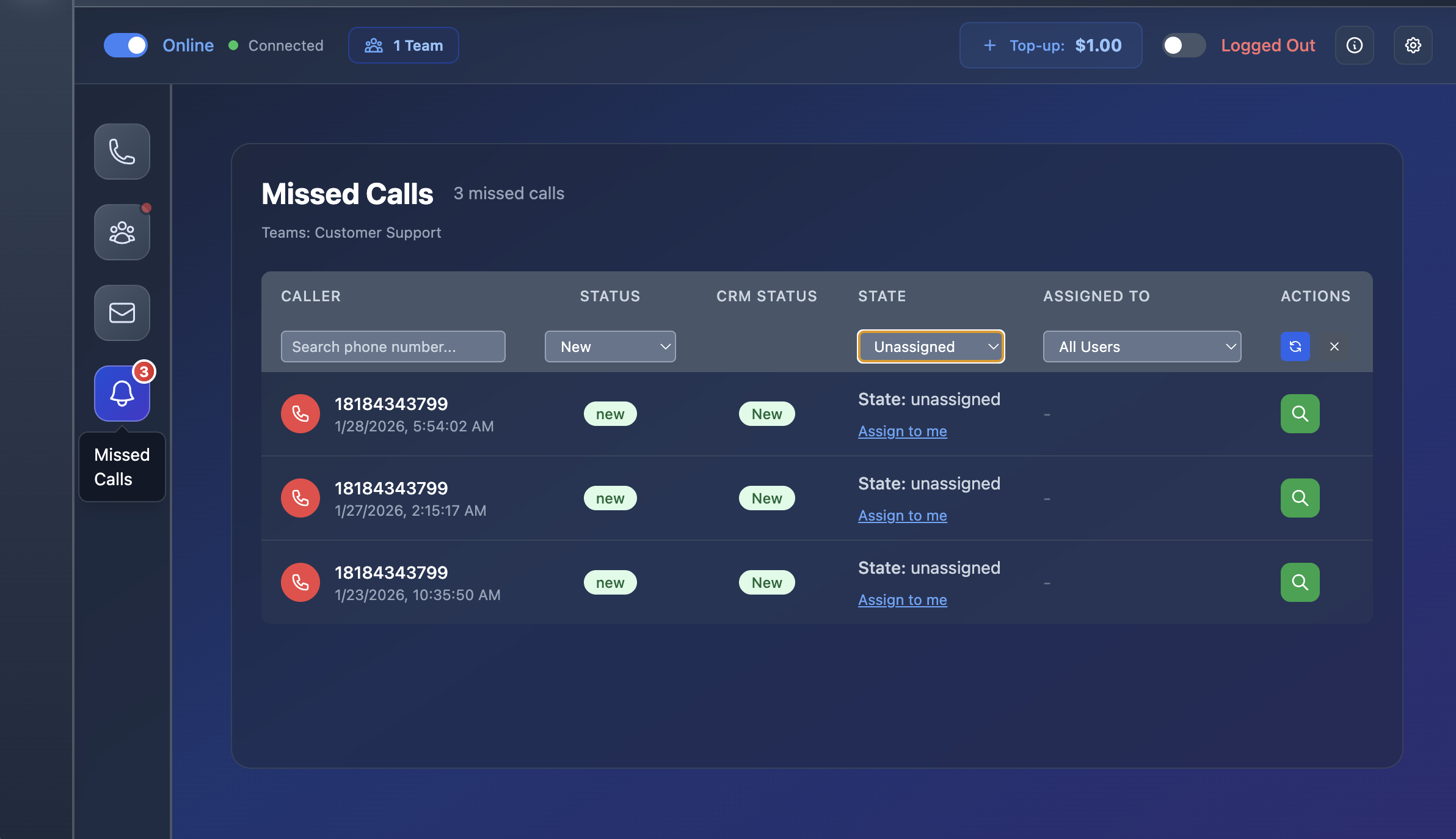
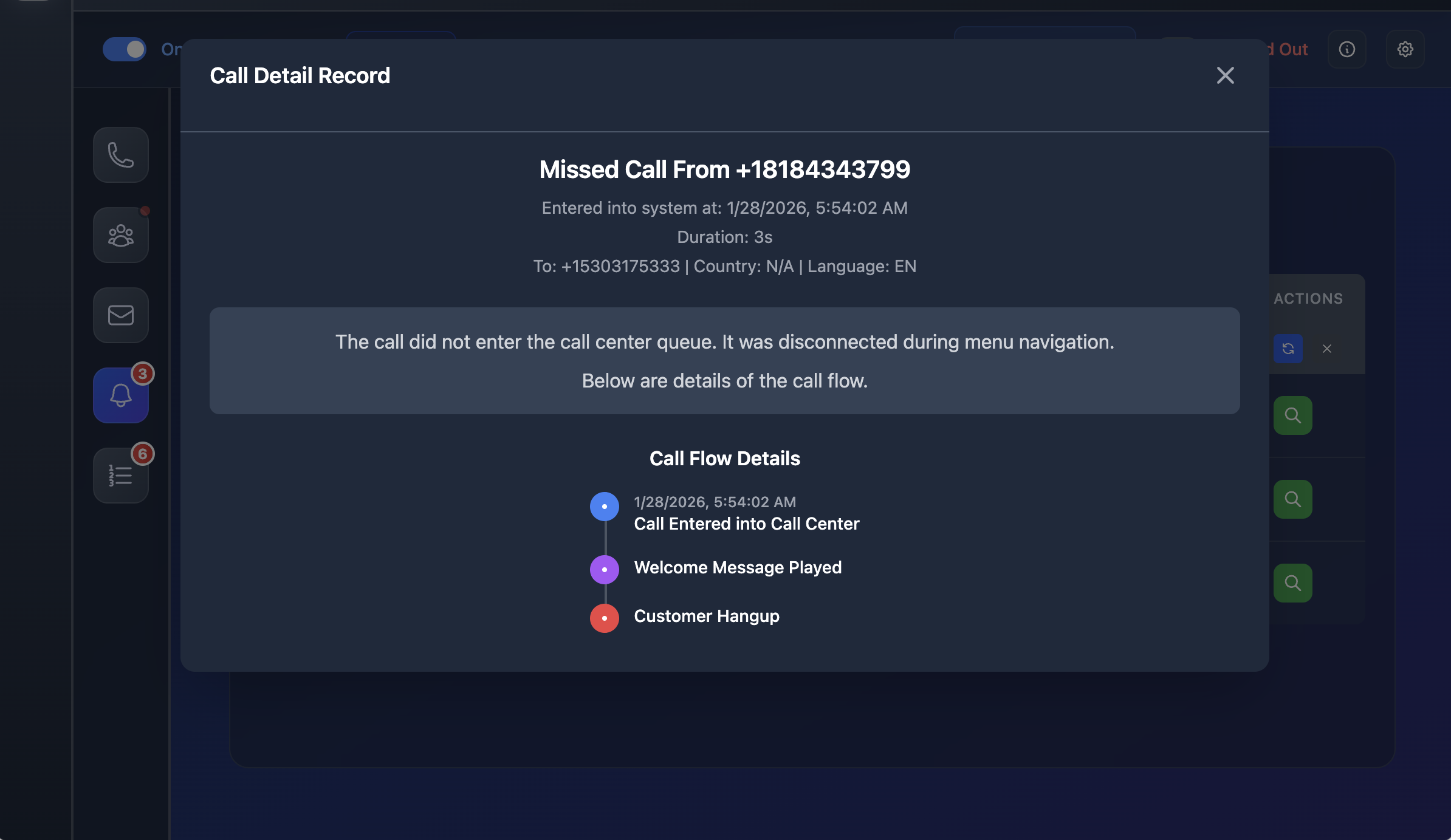
- Centralized missed call dashboard
- Full call flow timeline (IVR, welcome message, hang-up)
- Clear reason why the call was missed
- One-click assignment for follow-up
Voicemail and Call Follow-Up in One Place
When callers leave a voicemail, it’s instantly available with playback, timestamps, and assignment — making follow-ups fast and reliable.
Start free trial
No per-seat fees • usage-based billing • set up in under an hour
Who It's Best For: Use Cases for Small Business Call Center Software
Best for small teams that need professional inbound call routing and handling — with usage-based call center pricing, no per-seat fees, and no long contracts.
Small teams & startups
Teams of 2–30 that need IVR, queues, and reporting without per-seat pricing. Scale agents as you grow; pay for usage only.
Support & customer service
Support and service teams that want ACD routing, real-time reporting, and SLA visibility without enterprise complexity. Same platform as inbound call center software for larger teams.
Multilingual support
Small businesses serving multiple languages. IVR and routing by language get callers to the right queue without extra cost per agent.
Remote & hybrid teams
Distributed agents using the free desktop app from anywhere. Same queues, recording, and reporting whether agents are in-office or remote — cloud call center without the enterprise price.
Affordable Call Center Software Starting at $20/month
Transparent pricing that works for small budgets
Plans start at $20/month with usage included. Your full monthly fee is included as call usage — a $50 plan includes $50 of usage, a $100 plan includes $100, and so on.
No per-seat fees, no forced bundles, no contracts. Pay only for what you use — ideal for a call center for small business. Start small and scale naturally as call volume grows. See pricing for details.
- Usage-based billing (minutes + optional add-ons)
- Unlimited agents included
- No artificial call limits. Handle as many simultaneous calls as your team and usage allow — without per-channel restrictions or forced upgrades.
- Start with $1 credit
- Cancel anytime
Unlike “free” call center software that still requires paid traffic and servers, SimpleCallCenter includes everything in one simple price.
“Free” Call Center Software vs Real Costs
Some call center platforms are advertised as “free” because the software itself is open-source. However, you still need to pay for call traffic, servers, setup, and ongoing maintenance.
In practice, most small businesses end up using third-party providers for traffic, which often costs two to three times more than SimpleCallCenter — before counting infrastructure and time spent managing everything.
SimpleCallCenter includes call handling, infrastructure, and usage in one simple plan, so there are no hidden operational costs.
Compare Small Business Call Center Software
Is SimpleCallCenter right for your business?
Great fit if you:
Not ideal if you:
- Need outbound-heavy predictive dialing at scale
- Prefer long-term contracts and seat-based bundles
- Want a "chatbot-first" support model
Frequently Asked Questions About Small Business Call Center Software
What is small business call center software?
Small business call center software is a platform built for small teams to handle inbound calls with IVR, ACD routing, recording, voicemail, and reporting — without per-seat pricing or enterprise complexity. It typically offers usage-based billing and fast setup.
How quickly can I set up a small business call center?
With SimpleCallCenter, you can have your call center ready in under an hour. Set up IVR, queues, business hours, and voicemail without long deployments or contracts. See our getting-started guide.
How much does small business call center software cost?
Costs vary. SimpleCallCenter uses usage-based pricing: no per-seat fees, unlimited agents. Plans start at $20/month with usage included. You pay for call minutes and optional add-ons (recording, AI). Start with a $1 credit to try.
How does pricing work?
Pricing is usage-based: you pay for call minutes and optional add-ons (recording, AI transcription). There are no per-seat fees — unlimited agents are included. Plans start at $20/month with usage included. View pricing for details.
Can I try it free before buying?
Yes. SimpleCallCenter offers a $1 credit to try the platform. No long-term contract required. You can set up your call center, test IVR and routing, and only pay for what you use.
Does this work for small teams?
Yes, this software is designed for small business teams with simple pricing and fast setup.
Can I set up a call center quickly?
Yes. SimpleCallCenter is designed for fast setup — you can have a professional inbound flow with IVR, routing, and voicemail in under an hour. No long deployments or contracts.
What integrations are available?
SimpleCallCenter integrates with HubSpot and Zoho CRM via OAuth. Call records, recordings, and notes sync to your CRM.
Does this work with mobile and remote agents?
Yes. Agents can work from anywhere using the free desktop app or web app. The same queues, reporting, and call handling apply whether agents are in-office or remote — ideal for distributed and hybrid teams.
Can I use this software with remote agents?
Yes. You can use SimpleCallCenter with remote agents. Everyone uses the same queues, dashboards, and call handling from the free desktop app or web app — no office required.
What kind of analytics and reporting does it include?
SimpleCallCenter includes real-time dashboards and reports: answered calls, missed calls, wait times, agent activity, and trends. You get SLA visibility and call analytics to fix bottlenecks and hit service targets.
Is there a free trial or demo available?
Yes. You get a $1 credit to try the platform — no long-term contract. Set up your call center, test IVR and routing, and only pay for what you use. No demo sign-up required.
Does it include call recording?
Yes. Call recording and voicemail with alerts are included; optional AI summaries are available.
Does it include recording and AI summaries?
Yes. Call recording is available, and you can enable optional AI transcription and call summaries. Agent evaluation reports including AI evaluation and flagging are available. Billing is usage-based for these add-ons.
Is there a free desktop app?
Yes. SimpleCallCenter offers a free desktop app so agents can handle calls from their computer. Supervisors can control quality and monitor activity from the same platform.
Can one person work in multiple teams with different roles?
Yes. In SimpleCallCenter, one person can belong to multiple call centers. They can act as an agent in one team and a supervisor in another, while calls are routed correctly based on role and availability.
Does the $20 monthly plan include usage?
Yes. The $20 monthly plan includes $20 of usage. There is no separate base fee — your entire monthly payment goes toward actual usage.
Is free call center software really free?
Open-source call center software is free to download, but running it still requires paid call traffic, servers, setup, and maintenance. For many small businesses, the total cost ends up higher than an all-in-one hosted solution like SimpleCallCenter.
Start your small business call center in minutes
No contracts. No agent limits. Just clean inbound call handling with optional AI support.