Virtual call center · Remote agent software
Virtual Call Center Software — Remote Teams, Clean Routing, No Hardware
Run a professional call center with a distributed team. This remote agent software gives you IVR, call routing, queues, voicemail, and reporting — with optional recording and AI tools — without desk phones or per-seat pricing.
No credit card • No sales call • Set up in minutes
- Scale teams without hardware
- Cut avg hold time 40%+ with smart queues
- CRM integration included
- No per-seat fees
What “virtual call center” really means
A virtual call center lets agents work from anywhere while calls still follow clear rules: IVR menus, call routing software, queues, and reliable follow-up. Unlike traditional on-premise systems, cloud call center technology keeps the customer experience consistent — even when the team is fully distributed.
- •Add agents in minutes, not days — no desk phones or IT setup needed.
- •Reduce missed calls by 60%+ with smart routing, queues, and automated follow-up.
- •Cut supervision time in half with real-time dashboards and automatic reports.
- •Coach agents live — supervisors can listen, whisper, or join any call in real time.
Virtual vs. cloud vs. on-premise call centers
Comparing cloud call center software options — all three solve different problems. Here's how to pick.
| Virtual | Cloud | On-Premise | |
|---|---|---|---|
| Remote/hybrid support | Built-in | Yes | VPN required |
| Hardware needed | None | None | PBX + phones |
| Time to deploy | Minutes | Hours–days | Weeks–months |
| Scaling cost | Usage-based | Per-seat | Hardware + licenses |
| CRM integration | One-click setup | Varies by vendor | Custom development |
| Best for | Distributed teams, fast scaling | Office-first with remote option | Strict compliance, fixed location |
Bottom line: If your team is remote or hybrid and you need call routing software that scales without per-seat fees or hardware, virtual cloud call center technology is the clear choice.
What you get vs. traditional call centers
See how SimpleCallCenter compares to legacy PBX systems and typical cloud alternatives like Dialpad or Aircall.
Traditional / On-Premise
- ✗$10K–$50K+ upfront for PBX hardware, phones, and installation
- ✗Weeks to deploy — IT involvement, wiring, configuration
- ✗Remote agents need VPN and complex softphone setup
- ✗Adding agents = buying hardware — each desk phone costs $100–$500
- ✗CRM integration requires developers — custom middleware, ongoing maintenance
- ✗You manage updates & security — patches, backups, compliance
SimpleCallCenter (Virtual)
- ✓Plans start at $20/month — with usage included; no hardware costs, no surprise fees
- ✓Live in minutes — guided setup, no IT required
- ✓Remote-first by design — agents download app and start
- ✓Unlimited agents included — add team members at no extra cost
- ✓One-click CRM integration — HubSpot, Zoho, and more built-in
- ✓Fully managed platform — updates, security, backups handled for you
SimpleCallCenter vs. Aircall, Dialpad & More — Feature Comparison
How we compare to other cloud call center platforms on pricing, contracts, and key features.
| Feature / Platform | SimpleCallCenter | Aircall | Dialpad | Five9 | CloudTalk | Talkdesk | Nextiva |
|---|---|---|---|---|---|---|---|
| Per-Seat Pricing | ❌ None | ✅ Yes | ✅ Yes | ✅ Yes | ✅ Yes | ✅ Yes | ✅ Yes |
| Usage-Based Billing | ✅ Yes | ❌ No | ❌ No | ❌ No | ❌ No | ❌ No | ❌ No |
| Unlimited Agents | ✅ Included | ❌ Extra $ | ❌ Extra $ | ❌ Extra $ | ❌ Extra $ | ❌ Extra $ | ❌ Extra $ |
| Long-Term Contract Required | ❌ No | ✅ Often | ✅ Yes | ✅ Yes | ✅ Yes | ✅ Yes | ✅ Yes |
| Free Trial / Test Drive | ✅ $1 Credit Instant | ✅ Demo Call | ✅ Trial | ❌ Sales Only | ✅ Trial | ❌ Sales Call | ✅ Trial |
| Setup Time | 🚀 Minutes | 1–3 days | 1–2 days | 1–2 weeks | 1–3 days | 1–2 weeks | 1–2 days |
| IVR / Auto-Attendant | ✅ Included | ✅ Included | ✅ Included | ✅ Included | ✅ Included | ✅ Included | ✅ Included |
| CRM Integration (HubSpot/Zoho) | ✅ One-Click | ✅ Yes | ✅ Yes | ✅ Custom | ✅ Yes | ✅ Yes | ✅ Yes |
| Live Call Monitoring (Listen/Whisper/Barge) | ✅ All Included | ✅ Partial | ✅ Higher Tiers | ✅ Yes | ✅ Partial | ✅ Yes | ✅ Yes |
| Call Recording | ✅ Optional Toggle | ✅ Limited | ✅ Pro Plan | ✅ Yes | ✅ Yes | ✅ Yes | ✅ Yes |
| AI Summaries & Transcription | ✅ Optional Add-On | ✅ Add-On | ✅ Pro Plan | ✅ Enterprise | ✅ Partial | ✅ Enterprise | ✅ Yes (varies) |
| Remote/Hybrid Ready | ✅ Built-In | ✅ Yes | ✅ Yes | ✅ Yes | ✅ Yes | ✅ Yes | ✅ Yes |
| Call Queues + Routing Logic | ✅ Smart Queues | ✅ Yes | ✅ Yes | ✅ Yes | ✅ Yes | ✅ Yes | ✅ Yes |
| Visual Dashboard + Reporting | ✅ Real-Time | ✅ Yes | ✅ Yes | ✅ Yes | ✅ Yes | ✅ Yes | ✅ Yes |
| Click-to-Dial from CRM | ✅ Yes | ✅ Yes | ✅ Yes | ✅ Custom | ✅ Yes | ✅ Yes | ✅ Yes |
| Call Center Focus | 🎯 SMB/Remote Teams | 🎯 Sales | 🎯 UCaaS Hybrid | 🏢 Enterprise | 🎯 SMB | 🏢 Enterprise | 🏢 Mid-Market |
| Starting Price (10 agents) | 💸 From $20/mo (usage incl.) | ~$400/mo | ~$350/mo | ~$1,200/mo | ~$350/mo | ~$1,500/mo | ~$400/mo |
How remote agent call center routing works
Remote staffing only works if the system stays organized: intelligent call routing software routes correctly, queues manage busy periods, and automated follow-up captures every opportunity.
1) IVR + business hours
Route callers based on intent, language, and time-of-day — without involving a human first.
→ Deflect 20–30% of calls with self-service
IVR & routing →2) Queues + distribution
Calls go to the right queue. Agents can answer from anywhere while the queue stays fair and visible.
→ Cut average hold time 40%+ with smart routing
3) Follow-up built in
Missed calls and voicemail are captured with notifications, so nothing disappears in someone's inbox.
→ Recover 15–25% of otherwise-lost leads
Virtual contact center tools for remote teams
Everything you need to run a remote agent call center — from routing to reporting.
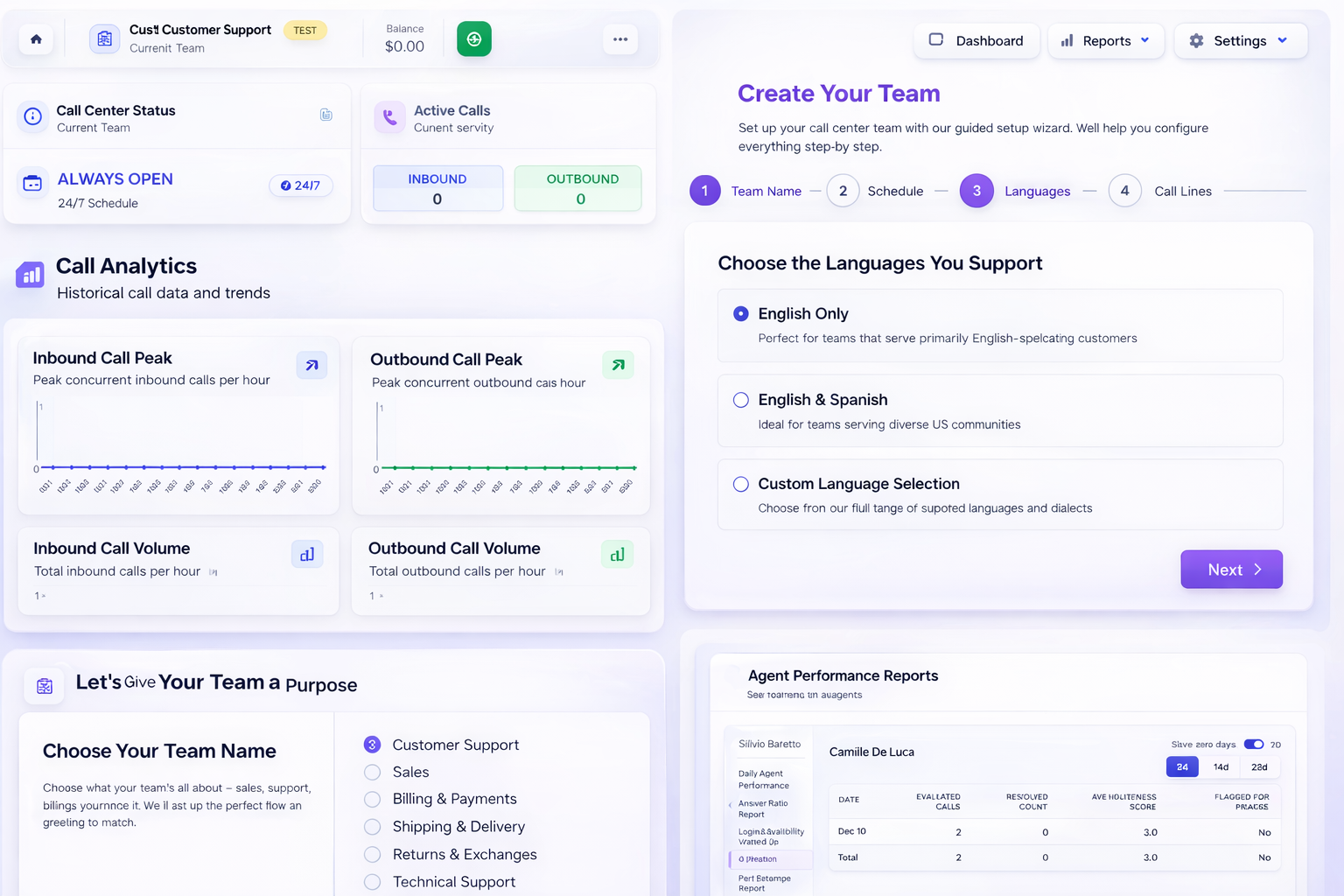
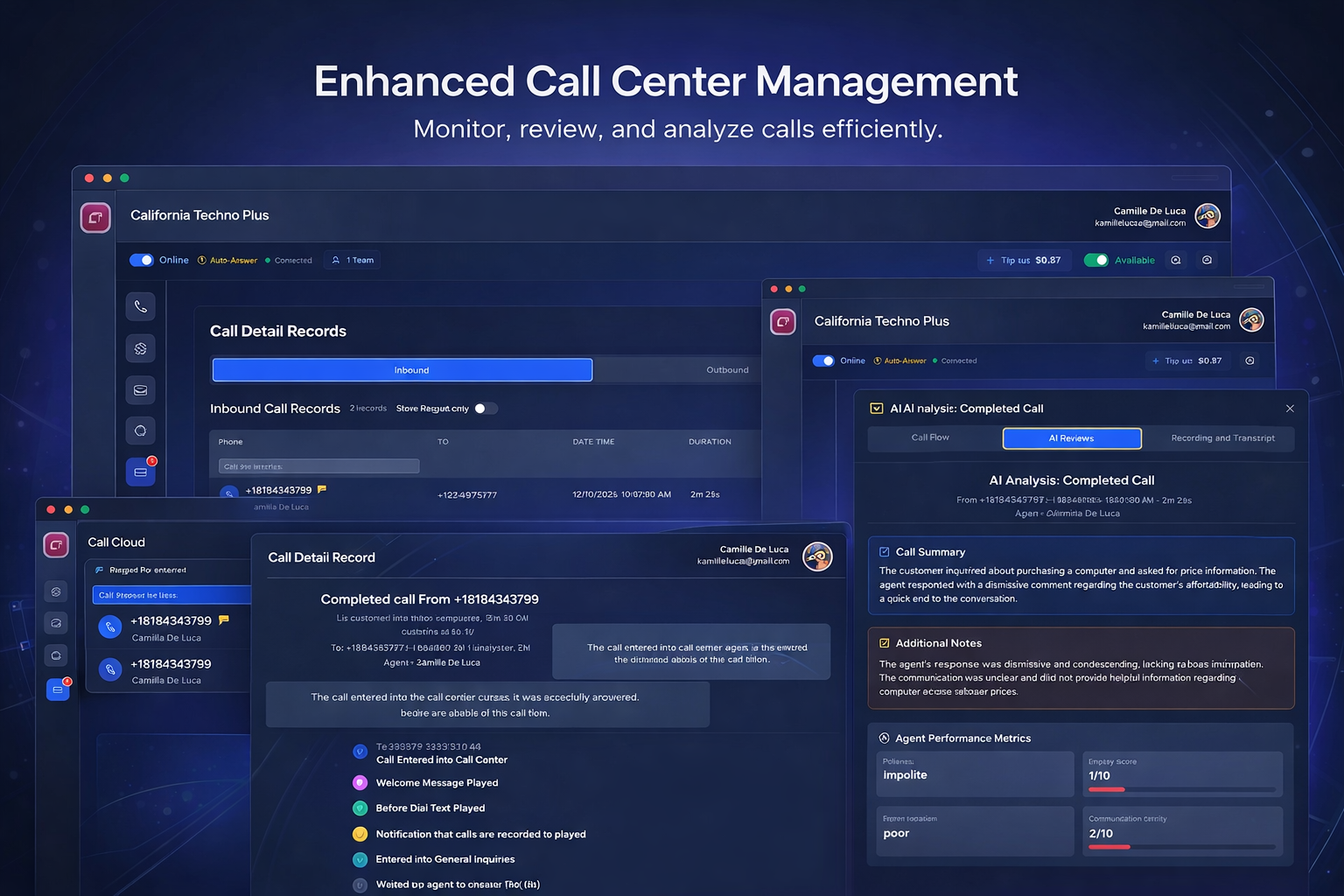
Agent status & reporting
See answered vs missed calls, wait times, and agent activity — without micromanaging.
→ Teams report 2–3 fewer hours/week on manual reporting
Live call monitoring
Supervisors can listen in, whisper to the agent only, or barge in to speak with both parties — all in real time.
→ Coach new agents live without disrupting the customer
Call recording (optional)
Enable recording when needed for QA, training, or documentation.
→ Resolve disputes faster, train new agents 30% quicker
Transcription & AI summaries (optional)
Turn AI on only when it helps — for selected queues, teams, or calls.
→ Skip 5-min call replays with 30-second AI summaries
Usage-based pricing
Costs follow call volume and enabled add-ons — not headcount.
→ Save 40–60% vs per-seat pricing for seasonal or growing teams
Real-time agent presence
See who's online, on a call, or on break — across time zones. Know instantly when coverage gaps appear.
→ Manage distributed teams like they're in the same room
Call center CRM integration
Connect to HubSpot, Zoho, and other CRMs with one click. Caller info pops up automatically; call logs sync back.
→ Agents see customer context before saying hello
Click-to-dial outbound
Make outbound calls directly from your CRM or desktop app. Manual dialing only — no robodialers or predictive campaigns.
→ Stay compliant while keeping outreach efficient
How teams use cloud call center software
Real scenarios from businesses running remote agent call centers.
SaaS Support Team
"We scaled from 3 to 12 remote agents in a month. No new hardware, no IT tickets. The CRM integration means our agents see customer context before they even say hello."
— B2B software company, 50 employees
E-commerce Customer Service
"Peak season used to mean chaos. Now we add seasonal agents in minutes and the IVR handles order status questions automatically. Hold times dropped 45%."
— Online retailer, remote-first team
Healthcare Scheduling
"Our receptionists work from home now. Call recording and AI summaries help us stay compliant while the missed call follow-up ensures no patient slips through."
— Multi-location medical practice
Frequently asked questions
Common questions about virtual contact center tools and cloud call center software
What is a virtual call center?
A virtual call center is phone system software that lets agents take and make calls from anywhere — no physical office or desk phones required. Calls are routed over the internet using VoIP technology, with features like IVR menus, queues, and reporting managed through a cloud-based platform.
How does virtual call center software work?
Virtual call center software routes calls over the internet (VoIP) instead of traditional phone lines. When a customer calls, the system greets them with an IVR menu, routes them to the right queue based on their selection, and connects them to an available agent — who could be anywhere in the world. All the agent needs is the desktop app, a headset, and an internet connection.
Do I need hardware?
No. Agents use a desktop softphone app on their computer with a headset. There's no PBX hardware, no IP phones to configure, and no IT infrastructure to manage. Just download the app, log in, and start taking calls.
Can this help inbound and outbound teams?
Yes. For inbound, you get IVR menus, smart call routing, queues, voicemail, and missed call follow-up. For outbound, agents can use click-to-dial from the app or your CRM — manual dialing only, no robodialers. Both directions include call recording, reporting, and optional AI summaries.
Is this software cloud-based?
Yes. SimpleCallCenter is fully cloud-based — there's no hardware to install or servers to maintain. Your team accesses everything through a desktop app, and all call routing, recording, and reporting happens in the cloud. Updates are automatic.
How is virtual different from a cloud call center?
The terms overlap, but "virtual" typically emphasizes remote/distributed teams, while "cloud" emphasizes the hosting model. SimpleCallCenter is both: it's cloud-hosted software designed specifically for virtual (remote) teams — with features like real-time presence, supervisor monitoring, and CRM integration that work across locations and time zones.
Can supervisors monitor remote agents in real time?
Yes. Supervisors can see agent status (online, on call, on break), view live queue metrics, and join calls in three ways: silent listen (monitor only), whisper (speak to agent only), or barge (speak to both parties). This works the same whether agents are in an office or working from home.
Does it integrate with my CRM?
Yes. SimpleCallCenter integrates with HubSpot, Zoho, and other popular CRMs. When a call comes in, the customer record pops up automatically. Call logs, recordings, and notes sync back to your CRM. Setup takes one click — no developer required.
Is there per-seat or per-agent pricing?
No. SimpleCallCenter uses usage-based pricing — you pay for call minutes and optional add-ons (like recording or AI), not for the number of agents. Add unlimited users at no extra cost. This makes it ideal for growing teams or businesses with seasonal call volume.
Scale your remote support team — without scaling costs
Cloud call center software that goes live in minutes. Add remote agents without hardware. Pay only for what you use.
- No hardware to buy
- No per-seat fees
- No long-term contracts