Inbound call center
Inbound Call Center Software — IVR, Smart Routing & Reporting
SimpleCallCenter is a cloud inbound call center solution that helps you answer more calls with IVR, smart routing, queues, voicemail, and live reporting — without per-agent pricing. Compare call center software and see our inbound pricing for usage-based plans and add-ons.
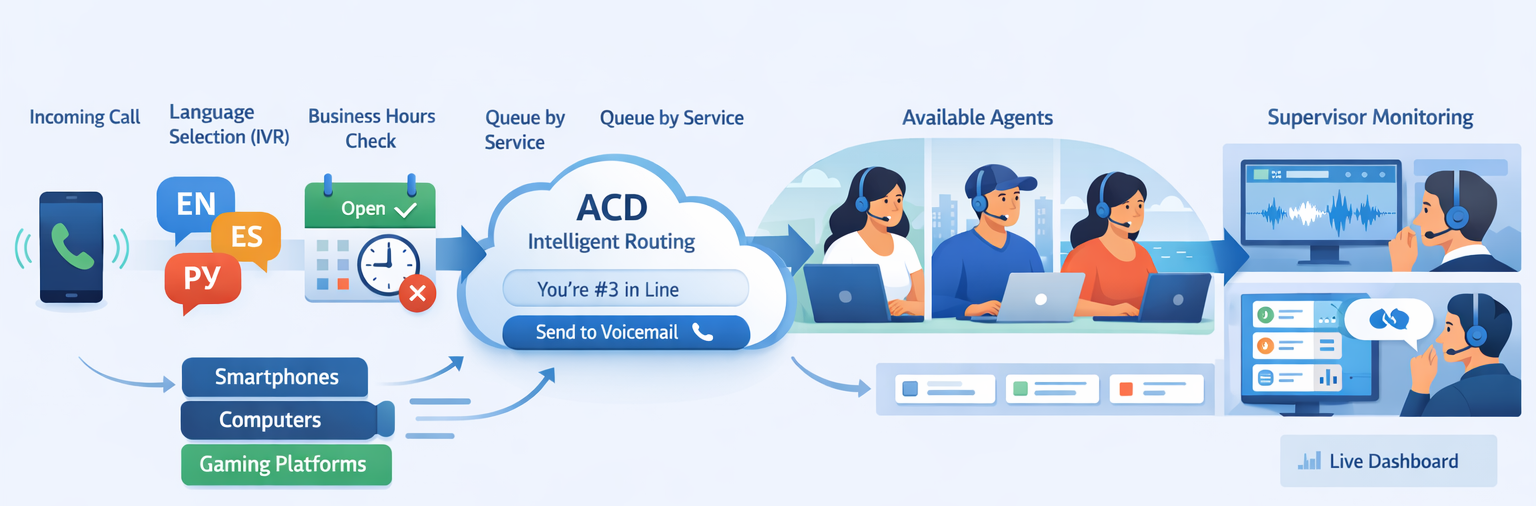
The diagram below shows how customer support for an electronics store is organized: 3 languages, 3 queues (Computers, Phones, Gaming), and business hours so calls outside opening times are handled correctly.
No credit card • No sales call • Set up in minutes
- IVR + business hours
- Smart routing + queues
- Reporting + missed calls
What Is Inbound Call Center Software?
Unlike traditional phone systems or per-seat contact center suites, inbound call center software is designed specifically for high-volume, customer-focused support and provides advanced routing, real-time dashboards & analytics, and flexible pricing models.
Inbound call center software manages incoming customer calls using IVR, Automatic Call Distribution (ACD), intelligent routing, queues, voicemail, and analytics. It’s designed to improve customer satisfaction and support team efficiency. As part of a cloud call center software setup, it runs in the browser with no on-premise hardware.
Clear outcomes. This software reduces missed calls, improves First Contact Resolution (FCR), and boosts Service Level Agreement (SLA) compliance — so more callers get the right answer quickly and your team hits its service targets.
Here’s how inbound call center software works and what it should fix:
What inbound call center software solves
Solving these issues leads to measurable improvements in Service Level Agreement (SLA), First Contact Resolution (FCR), and customer retention.
Why reducing missed calls increases customer satisfaction. Every unanswered call is a customer who may switch to a competitor or leave a bad review. Good inbound call center software reduces missed calls with queues, voicemail, and alerts so someone always follows up. When customers get a quick answer or a timely callback, they feel valued and are more likely to stay loyal.
How routing by language and product or service improves efficiency. Sending every call to a single line forces agents to triage and transfer, which wastes time and frustrates callers. Routing by language and product or service queue puts callers in the right queue from the start. Agents spend less time redirecting and more time solving issues, so average handle time drops and first-contact resolution goes up.
Inbound systems win on one thing: getting the right caller to the right person fast.
How Inbound Call Center Software Works
Understanding how inbound call routing works helps you evaluate solutions. A typical flow in three steps:
Caller reaches your number and enters the IVR menu
The caller dials your business number and is greeted by an IVR (Interactive Voice Response) menu. They choose language and, typically, product or service — via voice or keypad.
System routes the call to the right queue
Automatic Call Distribution (ACD) routes the call by language, product, or service into the matching queue. The best available agent in that queue is selected to answer.
Agent answers with context; exceptions are handled
The agent answers with queue context. If no one is available, voicemail fallback and missed-call alerts ensure follow-up; call analytics & dashboards track answer rates and SLA so you can fix gaps.
Features
When you compare call center software, these inbound call center features matter most: IVR, smart routing, queues, and reporting.
IVR & Business Hours Handling
Interactive Voice Response lets callers self-select service queues or language options via voice or keypad, improving route accuracy and reducing average handle times. Guide callers with menus, handle after-hours calls, and route by language and product or service. IVR options
Outcome: Callers reach the right queue faster; after-hours handling and voicemail reduce lost leads and keep satisfaction high.
Smart Routing & Intelligent Queues
Automatic Call Distribution (ACD) and intelligent queues ensure calls go to the best-qualified agent based on skill, language, and queue priority. That sends each caller to the right product or service queue so wait times drop and First Contact Resolution (FCR) goes up.
Outcome: Smart routing reduces average handle time and directs customers to the right agent on the first call, improving satisfaction and lowering churn.
Missed Calls, Voicemail & Alerts
Voicemail, missed-call alerts, and call logs ensure no call is dropped and every caller gets consistent follow-up, improving answer rates and customer trust. When no one is available, callers can leave a message and your team gets notified so follow-up stays consistent.
Outcome: Fewer dropped calls and timely follow-up mean higher answer rates, stronger customer trust, and fewer lost sales.
Reporting & Visibility
Call analytics & dashboards give you real-time visibility into answer rate, wait times, missed calls, and agent activity so you can spot bottlenecks and improve Service Level Agreement (SLA) compliance. Reporting & dashboards
Outcome: Clear metrics and SLA visibility let you fix bottlenecks before they become patterns and hit your service targets consistently.
Want deeper analysis? Enable recording, transcription, or AI call center features only when they’re useful. Explore all features for full capability explanations.
Automatically Generated IVR — Voice + Keypad
SimpleCallCenter automatically builds IVR menus and generates natural voice prompts in 80+ languages. Customers can navigate using speech recognition or keypad (DTMF), so you don’t need to record prompts or configure a separate flow per language. Route callers into product or service queues, then let ACD deliver the call to the best available agent.
- Auto-generated IVR menus for products and services
- Natural voice prompts in 80+ languages
- Speech recognition + DTMF (keypad) input
- No manual recordings required
- Fast updates when your menu changes
Inbound Call Center Features: IVR, Routing, Reporting & Queues
How key inbound call center features compare — so you can evaluate what matters for your team.
IVR
| Capability | SimpleCallCenter | Typical alternatives |
|---|---|---|
| Menu generation | Auto from products/services, 80+ languages | Manual recording or per-language setup |
| Input | Speech + DTMF (keypad) | Often keypad only or limited speech |
| Updates | Instant when menu changes | Re-record or reconfigure |
Routing
| Capability | SimpleCallCenter | Typical alternatives |
|---|---|---|
| By language | Yes, 80+ languages | Often limited or extra config |
| By product/service | Queues per product or service | Skill-based or hunt groups |
| ACD | Best available agent in queue | Varies by platform |
Reporting
| Capability | SimpleCallCenter | Typical alternatives |
|---|---|---|
| Real-time dashboards | Answer rate, wait time, missed calls | Common in dedicated CC software |
| SLA visibility | Yes | Often in higher tiers |
| Call logs & history | Yes; optional recording & AI | Varies |
Advanced queueing
| Capability | SimpleCallCenter | Typical alternatives |
|---|---|---|
| Queue types | Product/service queues, ACD | Skill queues, ring groups |
| Hold experience & callback options | Hold music, position, optional callback | Varies |
| Overflow / voicemail | Business hours + voicemail fallback | Common |
More capabilities inbound teams rely on
Inbound call center guides and modern setups often highlight these — and they matter for both efficiency and search.
Callback and hold experience
How callers experience hold matters. Good inbound software improves the hold experience & callback options with hold music, position-in-queue messaging, and optional callback so wait feels shorter and abandonment drops.
ACD & intelligent routing benefits
Automatic Call Distribution (ACD) and intelligent routing send calls to the right product or service queue; the best available agent in that queue answers. The benefits: less transfer churn, shorter handle time, and better First Contact Resolution (FCR).
SLA & service level performance
Service Level Agreement (SLA) and service level performance (e.g. “80% of calls answered in 30 seconds”) are easy to track with call analytics & dashboards. When you see shortfalls, you can adjust staffing or routing before they become a pattern.
CRM integrations
CRM integrations let agents see contact and deal context during the call. Inbound call center software that integrates with your CRM improves consistency and reduces repeat questions.
Call analytics and insights
Call analytics and insights go beyond basic counts: trends by time, queue, and outcome help you spot bottlenecks, plan staffing, and improve SLA and service level performance over time.
Call Center Software Comparison: Inbound vs Traditional
Use this call center software comparison to see how the best inbound call center software stacks up against basic business phone systems or legacy setups.
| Feature | Inbound call center software | Traditional phone / basic systems |
|---|---|---|
| Call routing | IVR, route by language, product/service queue, business hours | Usually basic forwarding or hunt groups only |
| Queues | Hold in queue, overflow, voicemail fallback | Often none; calls ring or go to voicemail |
| Reporting & analytics | Answer rate, wait time, SLA, missed calls, dashboards | Limited or none; basic call logs at best |
| Pricing | Usage-based; no per-seat fees (e.g. SimpleCallCenter) | Per-line or per-seat contracts common |
| Missed calls & follow-up | Voicemail, alerts, call logs, consistent follow-up | Voicemail only; easy to miss or delay follow-up |
| Scalability | Add agents and lines without per-seat lock-in; cloud-based | Often hardware or line limits; scaling = more contracts |
Best Inbound Call Center Solutions: SimpleCallCenter vs. Aircall, RingCentral, Zendesk & More
Buyers comparing inbound call center software often evaluate several platforms. Here’s how we differ on pricing, contracts, and key inbound call center features.
| Feature / Platform | SimpleCallCenter | Aircall | RingCentral | Zendesk | Dialpad |
|---|---|---|---|---|---|
| Per-seat pricing | ❌ None | ✅ Yes | ✅ Yes | ✅ Yes | ✅ Yes |
| Usage-based billing | ✅ Yes | ❌ No | ❌ No | ❌ No | ❌ No |
| Unlimited agents | ✅ Included | ❌ Extra $ | ❌ Extra $ | ❌ Extra $ | ❌ Extra $ |
| Long-term contract | ❌ No | ✅ Often | ✅ Yes | ✅ Yes | ✅ Yes |
| IVR & smart routing | ✅ Auto, 80+ lang | ✅ Yes | ✅ Yes | ✅ Yes | ✅ Yes |
| Reporting & dashboards | ✅ Real-time | ✅ Yes | ✅ Yes | ✅ Yes | ✅ Yes |
| Starting (10 agents) | 💸 From $20/mo (usage incl.) | ~$400/mo | ~$350/mo | ~$500/mo | ~$350/mo |
Inbound Call Center Metrics to Track
Strong inbound call center software gives you the numbers that matter for Service Level Agreement (SLA) and service level performance. Real-time dashboards & analytics help you spot problems and improve performance.
Answer rate
The percentage of calls that are answered (by a person or voicemail) within a set time. A low answer rate usually means understaffing, poor routing, or too many simultaneous calls — and more frustrated customers.
Average wait time
How long callers stay in queue before an agent answers. Tracking average wait time helps you balance staffing and routing so you can hit targets (e.g. under 30 seconds) and keep satisfaction high.
SLA compliance
Whether you’re meeting Service Level Agreement (SLA) targets, such as “X% of calls answered within Y seconds.” Inbound call center software with call analytics & dashboards makes it easy to monitor SLA compliance and fix shortfalls before they become a pattern.
Missed call rate
The share of calls that ring out or are abandoned before anyone answers. A high missed call rate often points to capacity or routing issues. Reducing it with better queues and follow-up (voicemail, alerts) directly supports customer retention.
Benefits for Teams
View inbound pricing to see usage-based plans and add-ons.
How It Works
A typical setup uses IVR + business hours, then routes calls to the right queue, and falls back to voicemail when needed. Learn how inbound call routing works with menus, language, and queues in detail.
IVR & Call Routing Logic
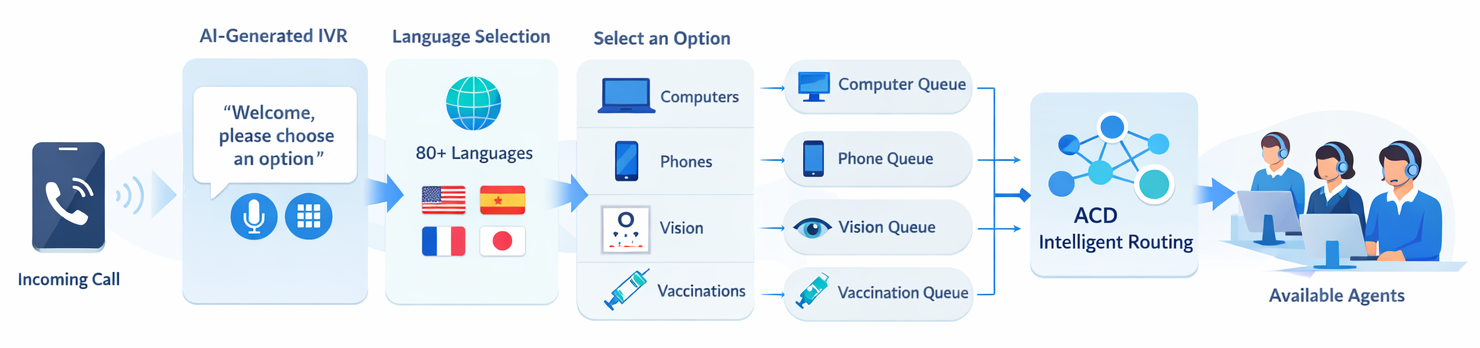
1) Greet & qualify
IVR menu (speech or keypad), language selection, and business hours handling.
2) Route & queue
Route to the right product or service queue and hold calls when agents are busy.
Who It’s Best For: Use Cases for Inbound Call Center Software
Best inbound call center solutions fit different team sizes and needs. Here’s who benefits most from our cloud inbound call center solution.
Small business & startups
Teams that need professional IVR, queues, and reporting without per-seat pricing or long contracts. Scale agents as you grow and pay for usage.
Growing support teams
Support and customer success teams that want smart routing by product or service, real-time dashboards, and SLA visibility without enterprise complexity.
Multilingual support
Call centers serving multiple languages. IVR and routing in 80+ languages get callers to the right queue without extra setup per language.
Remote & hybrid inbound teams
Distributed agents using the web app from anywhere. Same queues, reporting, and call handling whether agents are in-office or remote.
Shared Voicemail & Missed Call Processing
Inbound call center management doesn’t stop at answered calls. SimpleCallCenter provides a shared workflow for voicemail and missed calls, so every customer request is tracked.
When a voicemail or missed call arrives, it becomes a shared item for the team. Team members receive real-time notifications in the app. Agents can assign the item to themselves, mark it as in progress, and close it once handled — so no inbound request is lost, even during peak hours or after hours.
This helps inbound teams follow up on every call and ensures nothing slips through the cracks. It’s part of the inbound call center experience in SimpleCallCenter, not a separate product.
Frequently Asked Questions About Inbound Call Centers
What is inbound call center software?
Inbound call center software is a platform that handles incoming customer calls using IVR menus, routing, queues, and reporting so the right person answers. It typically includes business hours handling, voicemail, missed-call alerts, and dashboards — and often runs in the cloud so teams don’t need on-premise hardware.
How is inbound call center software different from regular phone systems?
Regular phone systems usually offer basic forwarding or hunt groups. Inbound call center software adds IVR menus, routing by language and product or service, queues with hold music and position announcements, real-time reporting and SLA metrics, voicemail and missed-call follow-up, and the ability to scale agents without per-seat pricing — so you get call-center-grade handling instead of a simple ring group.
Can inbound call center software support multiple languages?
Yes. Many solutions, including SimpleCallCenter, support multiple languages. IVR prompts and routing can be offered in 80+ languages so callers choose their language and are routed to the right queue without extra setup per language.
How much does inbound call center software cost?
Costs vary by vendor. Some charge per seat (e.g. per agent) plus usage; others use usage-based pricing with no per-seat fees. SimpleCallCenter uses usage-based pricing: you pay for call usage and optional add-ons (e.g. recording, AI), with no per-agent fees. See our pricing page for current rates and plans.
What inbound call center metrics should I track?
Key inbound call center metrics to track include answer rate (calls answered within a set time), missed call rate, average wait time (time in queue before an agent answers), and SLA compliance (e.g. percentage of calls answered in under 30 seconds). Real-time dashboards and reporting help you spot bottlenecks and improve performance.
What inbound call center KPIs should I track?
Key inbound call center KPIs to track include answer rate, missed call rate, average wait time, Service Level Agreement (SLA) compliance, and first-contact resolution (FCR). These KPIs help you measure team performance, spot bottlenecks, and improve customer satisfaction. Real-time dashboards make it easy to monitor them daily.
How does inbound call center software integrate with CRM?
Inbound call center software can integrate with your CRM so agents see contact and deal context when a call arrives, and call logs sync back automatically. SimpleCallCenter offers one-click integration with HubSpot, Zoho, and other popular CRMs — no custom development required.
Can inbound call center software support international/multilingual teams?
Yes. Inbound call center software can support international and multilingual teams with IVR and routing in 80+ languages, so callers choose their language and are routed to the right queue. Agents can work from anywhere, and queues can be organized by language or region to match your team structure.
Is inbound call center software different from omnichannel support?
Yes. Inbound call center software focuses on managing incoming voice calls with IVR, routing, queues, and call-specific reporting. Omnichannel support typically unifies voice, email, chat, social, and sometimes SMS in one platform so customers can switch channels with consistent context. Some products offer both; others specialize in voice-first inbound.
How does inbound call center software work?
Inbound call center software works by greeting callers with an IVR menu, routing them by language and product or service to the right queue, and connecting them to an available agent. A cloud inbound call center solution handles business hours, voicemail fallback, and reporting so you can track answer rates and missed calls.
What makes inbound call center software different from general call software?
Inbound call center software is built to handle incoming customer calls at scale: IVR menus, routing by product or service and language, queues, and reporting so the right person answers. General call software often focuses on outbound calls or simple forwarding without queues, analytics, or multi-agent routing.
Can it route calls by language or skill?
Yes. Each call center (e.g. Sales) has its own number; within it you route by language and product or service queue. IVR and smart routing send callers to the right product or service queue so agents don’t waste time triaging.
Does this software help with reporting and analytics?
Yes. You get visibility into answer rate, missed call rate, average wait time, and SLA compliance. Dashboards and reporting help you spot bottlenecks and improve performance. Optional add-ons include call recording and AI summaries for deeper analysis.
Does this work for small teams?
Yes. As small business inbound support software, it’s designed for small inbound teams that need professional routing, reporting, and follow-up without per-seat pricing.
Can I route calls by language or business hours?
Yes. A typical inbound flow uses business hours and IVR options (speech or keypad), then routes calls to the right queue.
Do you charge per agent?
No. Agents are not billed per seat. Pricing is usage-based.
Pricing & Plans
Add agents freely. Pay for call usage and optional add-ons — not seats.
Full details, rates, and add-ons are on our pricing page.
Related solutions
Build a cleaner inbound experience
Route calls properly, reduce missed calls, and scale your team without per-seat pricing. Try a cloud inbound call center solution built for small teams.